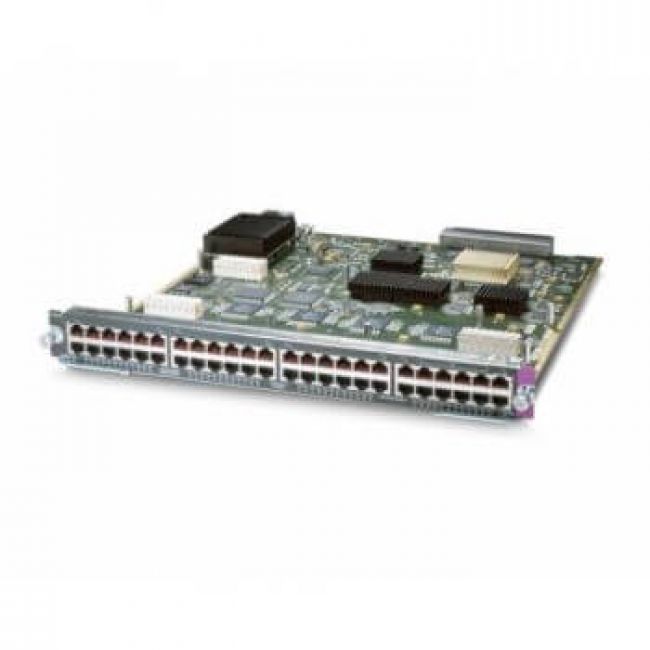
Модуль Cisco Catalyst WS-X6148-45AF (WS-X6148-45AF)

0 р.
Быстрый заказ
Наличие: уточняйте
Минимальный заказ: 10 000 руб.
Минимальный заказ: 10 000 руб.
Тендеры
Принимаем участие и помогаем нашим клиентам выигрывать тендеры и поставлять требуемую продукцию!
Гарантия
На всё сетевое и серверное оборудование предоставляется гарантия до 3-х лет, в том числе на снятые с производства позиции.
Описание Модуль Cisco Catalyst WS-X6148-45AF
Модуль для Cisco Catalyst 6500 Series, 48 портов 10/100BaseTX, Поддержка IEEE 802.3af PoE (Power of Ethernet) до 15.4W на порт
Технические характеристики
| Ports per module | •48 ports (all variants). Ports are numbered (left to right): –Top row, odd numbered ports 1-47. –Bottom row, even numbered ports 2-48. •Port groups: –WS-X6148-RJ-45—2 –WS-X6148A-RJ-45—6 •Port ranges per port group: –WS-X6148-RJ-45: 1-24, 25-48 –WS-X6148A-RJ-45: 1-8, 8-16, 17-24, 25-32, 33-40, 41-48 |
| Port connector type | RJ-45 (all variants) |
| Cabling distance | 328 ft (100 m) over Category 5, 5e, and 6 UTP/STP cable (all variants) |
| Buffer size | •WS-X6148-RJ-45, WS-X6148-45AF, and WS-X6148-RJ45V—1 MB per 8 ports •WS-X6148A-RJ-45 and WS-X6148A-45AF—5.3 MB per 8 ports |
| QoS | •Number of egress queues: 2 (6148), 4 (6148A) •Number of ingress queues: 1 (6148), 2 (6148A) •Number of thresholds per egress queue: 2 (6148), 8 (6148A) •Number of thresholds per ingress queue: 4 (6148), 4 (6148A) |
| Maximum frame size | •WS-X6148-RJ-45, WS-X6148-45AF, and WS-X6148-RJ45V—Up to 8092 bytes per frame •WS-X6148A-RJ-45 and WS-X6148A-45AF—Up to 9216 bytes per frame |
| Module oversubscription rate | 1.2:1 |
| Supervisor engine support | Supported on the following supervisor engines: •Supervisor Engine 2 •Supervisor Engine 32 •Supervisor Engine 32 PISA •Supervisor Engine 720 •Supervisor Engine 720-10GE •Supervisor Engine 2T (only supported with the WS-X6148A-RJ-45 and the WS-X6148A-45AF Ethernet modules) |
| Software support | •With Supervisor Engine 2—12.1(12c)E1 •With Supervisor Engine 32—12.2(18)SXF •With Supervisor Engine 32 PISA—12.2(18)ZY •With Supervisor Engine 720—12.2(18)SXF (6148A) •With Supervisor Engine 720 except with WS-F6K-48-AF PoE daughter card—12.2(14)SX (6148) •With Supervisor Engine 720 and WS-F6K-48-AF PoE daughter card—12.2(17d)SXB (6148) •With Supervisor Engine 720-10GE—12.2(33)SXH •With Supervisor Engine 2T—12.2(50)SY •Catalyst OS (6148A)—8.4(1) •Catalyst OS (6148)—6.4(11) (for software release 6.x); 7.6(9) (for software release 7.x) |
| Queues per port | •WS-X6148-RJ-45, WS-X6148-45AF, and WS-X6148-RJ45V –Tx—1p2q2t per 8 ports –Rx—1p2t per port •WS-X6148A-RJ-45 and WS-X6148A-45AF –Tx—1p3q8t –Rx—1q2t |
| Chassis/slot restrictions | No chassis or slot restrictions; the module can occupy any slot in any Catalyst 6500 or Catalyst 6500-E chassis (all variants). |
| Bus connection | Single connection into the 32-Gbps shared bus (all variants) |
| Module upgrades available | - |
| PoE support | •WS-X6148-RJ-45—Field upgradeable to the Cisco prestandard only with the WS-F6K-VPWR-GE= daughter card or both the Cisco prestandard and the IEEE 802.3af standard by installing the WS-F6K-GE48-AF= daughter card. •WS-X6148A-RJ-45—Field upgradeable to the Cisco prestandard and the IEEE 802.3af standard by installing the WS-F6K-GE48-AF= daughter card. See the Cisco Catalyst 6500 Series Power over Ethernet Daughter Cards Field-Upgrade Installation Note for field upgrade procedures. See Appendix A for further information on the PoE daughter cards. |
| Distributed forwarding support | Not supported. |
| Pluggable transceivers support | Not supported. |
| TDR support | Yes |
| Module front panel LEDs | STATUS •Green—All diagnostics pass; the module is operational. •Orange—The module is booting or running diagnostics. An overtemperature condition has occurred. (A minor temperature threshold has been exceeded during environmental monitoring.) •Red—The module is resetting. The switch has just been powered on or the module has been hot inserted during the normal initialization sequence. An overtemperature condition has occurred. (A major temperature threshold has been exceeded during environmental monitoring.) If the module fails to download code and configuration information successfully during the initial reset, the LED stays red; the module does not come online. LINK •Green—The port is active (the link is connected and operational). •Orange—The module or port is disabled through the CLI command or the module is initializing. •Flashing orange—The port is faulty and has been disabled. •Off—The port is not active or the link is not connected. PHONE •Green—The PoE daughter card is installed and detected. •Off—The PoE daughter card is not detected or is not installed. |
0 р.
